






Reading Waveforms: Core Concepts for New Oscilloscope Users

Reading Waveforms: Core Concepts for New Oscilloscope Users
If you’re just starting with an oscilloscope, you’re stepping into a powerful tool that translates electrical signals into visible shapes. A waveform is more than a squiggly line on a screen—it’s a story about voltage, time, and how a circuit behaves under different conditions. In this guide, we’ll lay out the core concepts that demystify waveforms, explain how to read and interpret them, and offer practical steps you can apply to real-world measurements. By the end, you’ll be better equipped to diagnose problems, verify designs, and understand what the signals in your electronics are trying to tell you.
Why waveforms matter
Electrical signals are dynamic. Unlike a simple DC reading, waveforms reveal changes over time—how voltage rises and falls, how long a signal stays high or low, and how clean or noisy a signal is. For engineers and technicians, waveforms answer questions like: Is a microcontroller sending data correctly on its serial line? Is a signal fast enough for the clock rate in a digital system? Is there overshoot, ringing, or jitter that could cause errors? Reading waveforms teaches you to predict behavior, verify specifications, and catch issues that would be invisible with a static voltage measurement.
The basic language of waveforms: terminology you’ll use often
To read waveforms effectively, you’ll need a common vocabulary. Here are the essentials you’ll encounter on most oscilloscopes and in manuals:
- Amplitude: The height of the waveform, typically measured in volts (V). In many scopes, you’ll see peak voltage (V peak), peak-to-peak (Vpp), and root-mean-square (Vrms) values.
- Timebase: The horizontal scale that sets how much time each division represents. This controls how “stretched” or “compressed” the waveform appears along the X axis.
- Vertical scale and offset: The vertical scale (volts per division) and vertical position. This sets how tall the waveform is on the screen and where it sits relative to the baseline.
- Trigger: A mechanism that synchronizes the display to a particular event in the waveform, so you can freeze the signal in a repeatable way. Triggers can be edges (rising/falling), pulses, widths, or more complex conditions.
- Bandwidth: The range of frequencies the scope can accurately reproduce. A scope with 100 MHz bandwidth can resolve signal components up to roughly 100 MHz without severe attenuation or distortion.
- Sampling rate: How many samples per second the scope collects to reconstruct the waveform. For real-time sampling, higher is usually better, especially for fast signals.
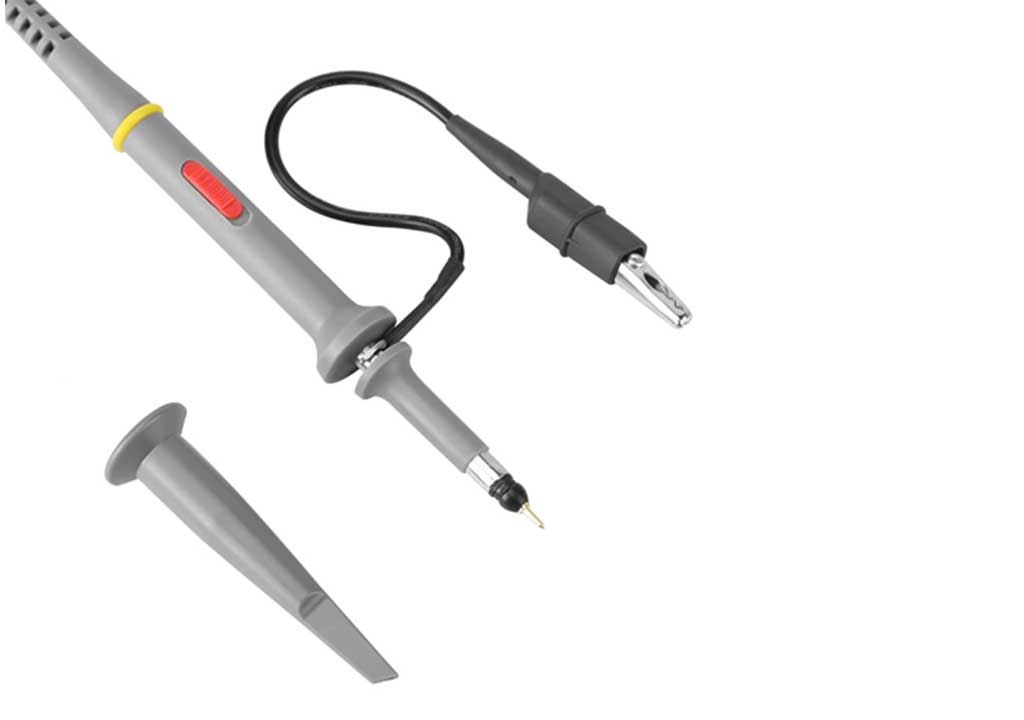
- Probes and compensation: The physical connectors and passive components that link the circuit to the scope. Probes can be 1× or 10×, and they may require compensation to ensure the displayed waveform matches the actual signal across frequencies.
- Persistence: A display feature that leaves traces of previous waveforms on the screen for a period of time, helping you visualize noise, jitter, or rare events.
- Cursors and measurements: Tools that let you measure quantities directly on the waveform, such as frequency, period, amplitude, duty cycle, rise time, and propagation delay.
- Math channels and FFT: Some scopes offer built-in math operations (sum, difference, product) and spectral analysis (FFT) to help analyze the frequency content of a signal.
Keeping these terms in mind will help you interpret what you’re seeing and communicate effectively with colleagues when you’re discussing a measurement or a problem you’ve encountered.
The oscilloscope interface: what each control does
While every oscilloscope is a little different, most share a familiar architecture. Understanding the core controls will help you set up quickly and interpret readings with confidence:
- Vertical controls (per-channel): Adjust the volts per division and vertical position for each channel. This tells the scope how tall the waveform should appear and where the baseline lies.
- Horizontal controls (timebase): Adjusts the time-per-division. Slower settings give you a broader view of repetitive signals; faster settings zoom in on fast edges or short pulses.
- Trigger controls: Decide what event starts the waveform display. Edge triggers are common for digital and analog signals; you can set trigger level and slope (rising or falling) to lock the display to a stable waveform.
- Probe selection and compensation: Choose between probe types (often 1× and 10×) and calibrate compensation so the displayed waveform is faithful across the frequency range you measure.
- Measurement tools: Many scopes offer automatic measurements (frequency, amplitude, duty cycle, rise/fall time) in addition to cursors. Use them to corroborate your own observations.
Getting comfortable with these controls is a milestone. A well-chosen vertical scale and a stable trigger can turn a chaotic screen into a readable, informative waveform in seconds.
Probes and probing techniques: accuracy starts at the tip
Probes are often overlooked, but they are essential for accurate measurements. A mismatched probe or poor grounding can distort the waveform and lead to incorrect conclusions. Here are practical tips for probing correctly:
- Choose the right probe attenuation: A 1× probe is straightforward but adds more loading to the circuit and is less suitable for high-frequency signals. A 10× probe reduces loading and extends bandwidth, but it reduces the signal amplitude by a factor of 10, so you must account for this in your measurements.
- Use proper grounding: A long ground lead can act like an antenna and introduce noise or ringing. Use a short ground lead or a ground spring to minimize loop area. For high-frequency work, consider a differential probe or a ground-midpoint reference if possible.
- Probe compensation: Many passive probes require compensation to ensure accuracy across frequencies. A compensation nut or adjustment screw aligns the probe’s RC characteristics with the oscilloscope channel. A miscompensated probe can distort square waves, making edges appear rounded or uneven.
- Check the bandwidth match: If you’re measuring a fast edge near the probe’s bandwidth limit, you’ll see distortion. Make sure the probe’s bandwidth is adequate for the signal you’re trying to capture.
Taking a moment to set up the probe correctly saves you from chasing phantom issues later and makes your measurements more reliable.
Reading waveforms: a practical, step-by-step approach
When you approach a new signal, a repeatable method helps you extract meaningful information quickly. Here’s a straightforward workflow you can apply to most signals:
1) Establish safety and visual confirmation: power the circuit in a safe manner, ensure you’re not shorting anything with the probe, and observe the screen to see a stable waveform.
2) Set a reasonable vertical scale: pick a volts-per-division setting that fills roughly 60–90% of the screen height without clipping. This makes subtle features easier to read.
3) Choose an appropriate timebase: start with a timebase that shows at least a few cycles of the waveform. For a 1 kHz signal, a timebase that shows 1–2 ms/div can be a good starting point; for a 1 MHz signal, you’ll likely use a few hundred nanoseconds per division.
4) Establish a robust trigger: set a rising-edge or falling-edge trigger at a level near the signal’s average value but clearly distinct from noise. This keeps the waveform stationary for repeated measurements.
5) Use cursors or automated measurements: place vertical cursors to measure a period, then compute frequency. Enable auto-measurements for sanity checks (frequency, duty cycle, amplitude). Compare manual calculations with automatic readings to validate consistency.
6) Look for key waveform features: flat tops, clean transitions, constant amplitude, no unexpected overshoot, and minimal noise. Note any ringing after transitions or jitter in timing.
7) Zoom in on details: use zoom or depth control to inspect rising/falling edges, overshoot, and undershoot. Check if the edges are clean or curved, and measure rise/fall times if needed.
This approach isn’t just about getting a number; it’s about forming a narrative of how the circuit behaves. With experience, you’ll know which features to look for based on the device under test and the measurement goals.
Common waveforms and what they tell you
Familiarize yourself with typical shapes you’ll encounter. Each waveform carries clues about the circuit or signal source:
- Sine wave: A clean sine wave indicates a stable, linear source with low distortion. It’s a good baseline signal for audio, RF, and analog systems. Deviations from a pure sine can reveal harmonics, noise, or nonlinearity.
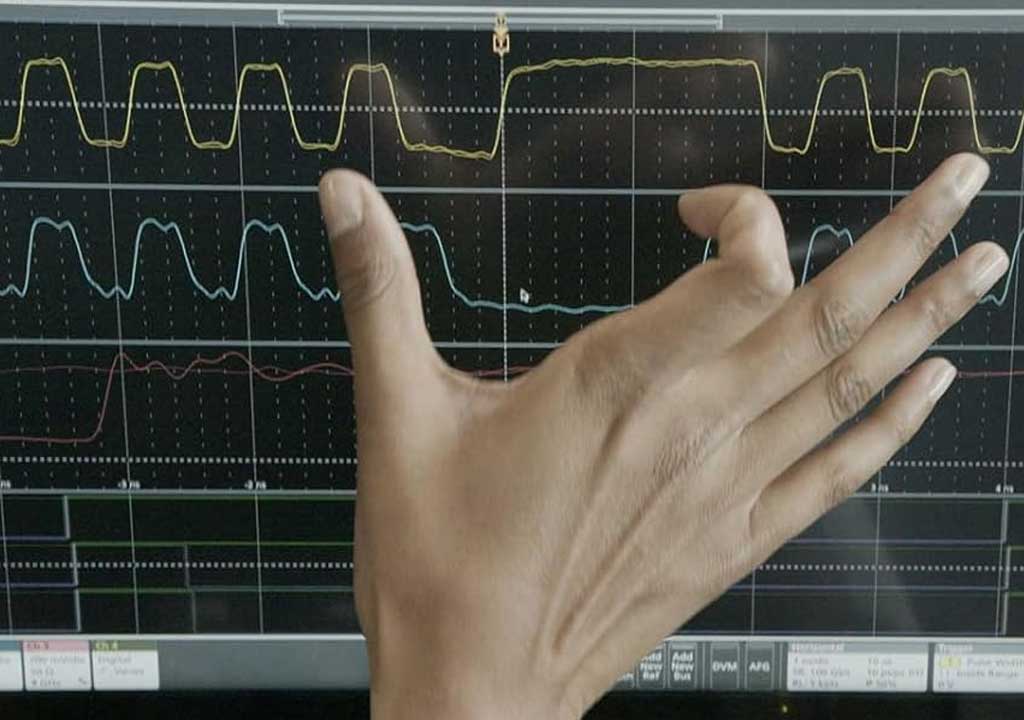
- Square wave: The sharp transitions are rich in high-frequency content. A clean square wave with fast rise/fall times demonstrates good bandwidth, while slow edges indicate bandwidth limits or RC effects in the circuit or probe.
- Pulse train: Narrow pulses with variable duty cycle measure timing precision and the ability of a system to respond quickly. Duty cycle irregularities or jitter can reveal timing errors or moisture in a digital system.
- Sawtooth/triangle: These waveforms appear in waveform generators and DAC output stages. Look for linearity (for triangle/ ramp) and symmetry. Distortion points to nonlinearities or bandwidth limits.
- Noise and jitter: A waveform with a noisy baseline or jittery timing indicates power supply noise, ground loops, or thermal effects. Noise analysis is crucial in analog front-ends and sensitive digital systems.
Being able to recognize these shapes and their typical distortions will help you diagnose problems faster and understand how design choices affect signal integrity.
Digital signals and timing measurements
Many scopes are used to inspect digital communications and microcontroller interfaces. When you’re reading digital waveforms, timing accuracy and signal integrity are paramount:
- Edge timing and jitter: How consistent are transitions from low to high? Jitter can cause timing violations in high-speed buses or codecs. Use a high sampling rate and a stable trigger to quantify jitter.
- Duty cycle: In clocks and PWM signals, duty cycle accuracy matters. A duty cycle off from 50% can affect timing in synchronous circuits and LED brightness control, among other things.
- Rise and fall times: How quickly a signal transitions affects the amount of high-frequency content and the likelihood of ringing when driving traces or connectors.
- Eye diagrams and jitter analysis: Some advanced scopes offer eye diagram views or FFT-based jitter analysis for serial data. These tools help you assess a link’s reliability under real conditions.
When measuring digital systems, you’ll often rely on differential measurements, multiple channels, and math operations (e.g., XOR or difference between signals) to isolate timing relationships and validate protocol behavior.
Timebase, sampling, bandwidth, and Nyquist—what you must know
Two concepts are essential for understanding what your oscilloscope can faithfully display: bandwidth and sampling rate. They determine how accurately you can capture fast events and rapid changes in a waveform.
- Bandwidth determines fidelity at high frequencies: A scope’s bandwidth defines the highest frequency component it can reproduce without severe attenuation. If you’re measuring fast edge transitions, you need a bandwidth high enough to capture those edges accurately.
- Sampling rate and real-time performance: The sampling rate sets how often the scope samples the signal per second. A common rule of thumb is that you want at least 5–10 samples per period for a reasonably accurate representation, but for high-fidelity edge capture or dense waveforms, you may need many more samples per period.
- Nyquist considerations: If your sampling rate is too low relative to the signal’s highest frequency, you’ll see aliasing—the apparent low-frequency or distorted waveform that is not what the circuit actually produced. To avoid aliasing, ensure your sampling rate is sufficiently above twice the highest frequency component of interest (the Nyquist limit).
In practice: for a clean edge at 100 MHz, you’d want a scope with bandwidth well above 100 MHz and a sampling rate comfortably above 200 MSa/s per channel, ideally 500 MSa/s or more, depending on the complexity of the waveform and scope capabilities. If you must work with limited bandwidth, you can still glean meaningful information by focusing on lower-frequency content or using techniques like averaging or math to extract relevant timing features.
Aliasing, persistence, and noise: reading what you see
Aliasing happens when the scope can’t sample fast enough to reconstruct fast events, causing the display to misrepresent the signal. You may see a slow, misleading waveform or a spurious frequency that doesn’t exist in the actual signal. To minimize aliasing:
- Increase the sampling rate when possible or adjust the timebase to bring the waveform into a range where sampling is sufficient.
- Use the bandwidth limit feature if the scope provides it. A band-limited measurement can reduce high-frequency noise that doesn’t affect your measurement goals.
- If available, employ averaging or digital filtering to suppress random noise. Be mindful that filtering can obscure transient events or jitter, so use it judiciously for the analysis you’re performing.
Persistence is a useful visual aid when you’re diagnosing jitter and noise. A long-persistence display makes infrequent events more visible and helps you see how often a phenomenon occurs, which is particularly helpful for intermittent faults.
Cursors, measurements, and the value of numbers
Most oscilloscopes provide built-in measurement capabilities. They can automatically show frequency, period, peak-to-peak amplitude, RMS, rise time, fall time, and duty cycle. Cursors—two or more vertical or horizontal lines you place on the screen—are a simple way to measure time intervals and voltage differences manually:
- Place cursors on two points of interest to measure delta time (?t) and, if vertical cursors are used, delta voltage (?V).
- Use automatic measurements to cross-check manual calculations. If measurements disagree, re-check trigger stability, vertical calibration, and probe compensation.
Be mindful that the numbers you read depend on your setup. If you adjust the vertical scale or change the probe, the measured values can change accordingly. Always confirm that your setup is appropriate for the measurement you want to report.
Math channels and spectrum analysis: extra tools that help diagnose complex signals
Some scopes offer math channels that add, subtract, multiply, or integrate signals from different channels. These are particularly useful when you need to isolate a signal from a combined waveform or when you want to visualize a derived quantity (for example, the difference between a reference signal and a measured signal).
FFT (Fast Fourier Transform) analysis converts a time-domain signal into a frequency-domain spectrum. This is valuable for identifying dominant frequencies, harmonics, and overall spectral content. FFT can help you diagnose issues like harmonic distortion, EMI, or noise sources. When interpreting an FFT, remember:
- The FFT shows energy distribution across frequencies, not a time-domain waveform. It’s a snapshot of what frequencies are present, averaged over a measurement window.
- Windowing, resolution, and dynamic range affect the appearance and interpretability of the spectrum. If you’re not seeing expected peaks, consider adjusting the window length or resolution settings.
Using math and FFT tools can reveal insights that are hard to see in a pure time-domain view, especially for analog front-ends, filters, or power electronics where frequency content matters.
Practical scenarios: measuring a microcontroller-driven signal
Let’s walk through a simple, realistic scenario: you want to verify a microcontroller’s UART TX line at 115200 baud and also check a clock signal on a timing-critical path.
1) Verify the UART TX waveform: Connect the probe to the TX line with a proper ground reference. Start with a modest timebase (e.g., 200 µs/div) to view multiple bytes. Set a rising-edge trigger on the start bit and zoom in on a few frames to inspect the high/low durations. Use the built-in digital measurements to confirm bit time (about 8 data bits + 1 start bit + 1 stop bit at 115200 baud gives roughly 86.7 µs per frame). Confirm the voltage levels are within the expected logic thresholds for your MCU family. Look for glitches in the data bits or framing errors indicated by misalignment between sent bytes and expected values.
2) Check a clock signal: Probe a clock net on the same board. If your clock runs at, say, 50 MHz, you’ll want a bandwidth comfortably above that frequency. Start with a timebase that shows at least several periods of the clock. Look at the rise/fall times to ensure the clock’s edges are clean enough for the digital logic it drives. If you observe ringing or overshoot, you may need a shorter probe ground, a better grounding strategy, or even a different measurement point to avoid loading the circuit.
3) Investigate a power rail: A noisy supply can cause jitter in timing-sensitive circuits. Use a DC-coupled probe on the 3.3 V rail with a slow timebase to see broad fluctuations, then switch to a faster timebase to inspect high-frequency ripple. If you notice periodic ripple, verify the power supply and filtering network. If the ripple is irregular, consider grounding and layout issues or switching regulator noise coupling into sensitive lines.
Safety and best practices: keeping you and your equipment safe
Working with oscilloscopes involves handling live electronics, which can be hazardous. Here are safety reminders to keep in mind:
- Always start with the lowest-risk configuration. If you’re unsure about potential voltages, use a high-impedance probe and limit the attachment to a safe portion of the circuit.
- Use proper grounding. A solid ground connection reduces noise and prevents accidental shorts. Avoid long, looping ground leads when measuring high-frequency signals.
- Do not exceed probe or channel voltage ratings. Check the probe’s maximum input voltage and ensure you stay within safe limits for all measurement points.
- Respect safety standards and your lab’s policies. If you work with high voltages or dangerous environments, use appropriate isolation equipment and follow established procedures.
Common pitfalls and how to avoid them
Even experienced users encounter recurring issues. Here are some typical pitfalls and practical fixes:
- Misinterpreting a distorted square wave: If the square wave appears rounded or smeared, you’re likely hitting bandwidth or probe compensation limits. Check the probe compensation, and increase the bandwidth by choosing an appropriate probe and settings.
- Reading the wrong signal due to ground loops: A ground loop can add artificial hum or noise. Shorten ground leads, anchor the reference ground, and consider differential probes if common-mode voltages are a concern.
- Aliasing masquerading as a slow waveform: If you notice strange, repeating patterns that don’t match the expected signal, your sampling rate may be too low. Increase the sampling rate, adjust the timebase, or use a scope with higher bandwidth to capture the true signal shape.
Tips for beginners: building intuition faster
As you gain experience, you’ll develop a practical intuition for which settings to adjust first. Here are some quick tips to accelerate your learning:
- Start with a stable, known signal: Use a function generator to produce a clean sine wave to verify your scope’s basic operation. Once you’re confident, connect to real-world circuits.
- Use the same ground reference consistently: If you switch measurement points, re-check ground connections to avoid misreadings caused by ground differences.
- Document your measurements: Save screenshots of important waveforms and note the scope settings you used. This helps you reproduce results and communicate findings with teammates.
Putting it all together: a step-by-step measurement checklist
When you’re about to measure a new signal, you can follow this concise checklist to stay organized and avoid missing important details:
1) Confirm safety and reset the scope: power off, reset to a known baseline, and connect probes with proper grounding.
2) Set a reasonable vertical scale per channel so the waveform is clearly visible without clipping.
3) Choose a timebase that shows several cycles of the waveform and allows you to see both the period and the edge behavior.
4) Configure an appropriate trigger to stabilize the waveform display. Consider edge triggering for digital-like signals and more complex triggers for irregular patterns.
5) Enable essential measurements and, if relevant, enable FFT or math channels for deeper analysis. Compare automatic readings with manual calculations for validation.
6) Inspect for noise, jitter, overshoot, ringing, and any anomalies. Zoom in on edges to evaluate rise/fall times and edge quality.
7) If the signal looks suspicious, try alternative grounding paths or different probe types and re-check the results to confirm the issue is not instrumentation-related.
Conclusion: reading waveforms as a window into electronics
Mastery of reading waveforms goes beyond memorizing controls. It’s about building a mental model of how signals should behave, how circuits should respond to changes, and how real-world factors like noise, impedance, and timing constraints shape those responses. An oscilloscope is the tool that makes those invisible dynamics visible, giving you the data to verify designs, diagnose issues, and improve performance.
As you practice, you’ll discover that the most valuable skill is not just “seeing” a waveform but interpreting what it implies about the circuit under test. Start with fundamentals—the basics of voltage, time, and triggering—and progressively add complexity with measurement features, math operations, and spectrum analysis. With patience and systematic approach, you’ll turn every waveform into actionable insight, and you’ll gain confidence in your ability to engineer, debug, and optimize electronic systems.
Whether you’re a student taking your first steps into electronics or a professional expanding your measurement toolkit, reading waveforms is a foundational competency that unlocks the language of circuits. Remember: clear measurements, careful probing, and thoughtful interpretation will take you farther than chasing the latest feature or a quick, glossy reading. By grounding your practice in these core concepts, you’ll build reliability, reduce debugging time, and develop a deeper understanding of how electronic systems really work.
LIKED THIS ARTICLE? SHARE IT: