






Troubleshooting Common Oscilloscope Issues: Tips for Starters

Troubleshooting Common Oscilloscope Issues: Tips for Starters
Oscilloscopes are powerful yet approachable tools for understanding electrical signals. For beginners, a few common roadblocks can make even simple measurements feel intimidating. The good news is that most oscilloscope problems fall into a handful of categories—probe issues, grounding and connections, settings and measurement modes, or the instrument itself. With a systematic approach, you can diagnose and fix many issues in minutes, not hours. This guide is written for starters and walks you through practical steps, common symptoms, and concrete fixes. You’ll also find a practical troubleshooting workflow you can apply to real-world measurements.
1. Understanding what the oscilloscope does
Before diving into troubleshooting, it’s helpful to recall the basic components involved in an oscilloscope measurement and how they interact. A typical bench oscilloscope has:
- a front-end input channel with a probe and a local impedance (often 1 M? in parallel with a small capacitance),
- a time-base that defines horizontal sweep and sample timing,
- a vertical scale control that sets volts per division for each channel,
- a trigger system that decides when the display should update and what part of the waveform to anchor on,
- a digital sampling system with a specified bandwidth and sample rate,
- and various display and measurement options (AC/DC coupling, probe compensation, math channels, persistence, etc.).
Many problems arise at the interface between the signal and the scope: a loose probe, a mis-set coupling, a long ground lead, or an overtaxed sampling rate. Understanding these parts helps you diagnose the root cause rather than chasing symptoms.
2. Common problems and quick fixes
Below is a list of frequent symptoms you may encounter, followed by straightforward steps to fix them. Treat this as a menu of checklists you can run through in order.
2.1 The display is blank or the scope won’t power up
Symptoms: No display, no boot sounds, the screen stays dark even though the power is on.
- Check power supply and power switch. Make sure the unit is plugged in and the outlet is live. Some scopes have a dedicated power switch on the rear or side; confirm it’s in the “on” position.
- Verify the display brightness/contrast. If brightness is set to minimum, a dim screen may look blank. Adjust brightness and contrast if applicable.
- Look for a standby or sleep mode indicator. Some scopes require a confirmed user action to exit sleep/standby after power-on.
- Inspect the power cable and the fuse. If you’re comfortable, swap the fuse for a known-good one. Do not bypass safety features.
- External display or monitor connections? If you’re using an external display, verify its input source and the HDMI/DisplayPort cables.
If none of these steps restore the display, the issue could be internal (power board, backlight, screen panel). In that case, contact the manufacturer or a service technician. Note your model number, firmware version, and any recent changes you made before the issue appeared.
2.2 No signal or a flat line (0 V) on the screen
Symptoms: The trace is a straight line along the center or baseline, or there’s no identifiable waveform.
- Confirm the channel is enabled and not muted. Check the channel power LED or the on/off switch for the channel.
- Verify the probe is connected properly to the channel input and to the device under test. Confirm the BNC connection is snug.
- Check the input coupling. Ensure it’s set to DC or AC as appropriate for the signal. If you’re measuring a DC level, use DC coupling; for signals centered around zero or slowly varying, AC coupling can hide DC offsets.
- Make sure the ground reference is established. Connect the probe ground clip to a solid chassis ground point on the circuit. A loose ground can result in a truncated or meaningless trace.
- Inspect the probe. A damaged probe or a probe with the slider set to the wrong attenuation (1x vs 10x) can distort or mute the signal. Confirm the probe’s attenuation matched in the scope’s channel settings.
Tip: Use the built-in test signal or a known reference (e.g., a function generator output) to verify the channel and probe path at the start of a session.
2.3 A noisy, grainy, or fuzzy trace
Symptoms: The waveform looks spotty or smeared, especially at higher voltages or with long leads.
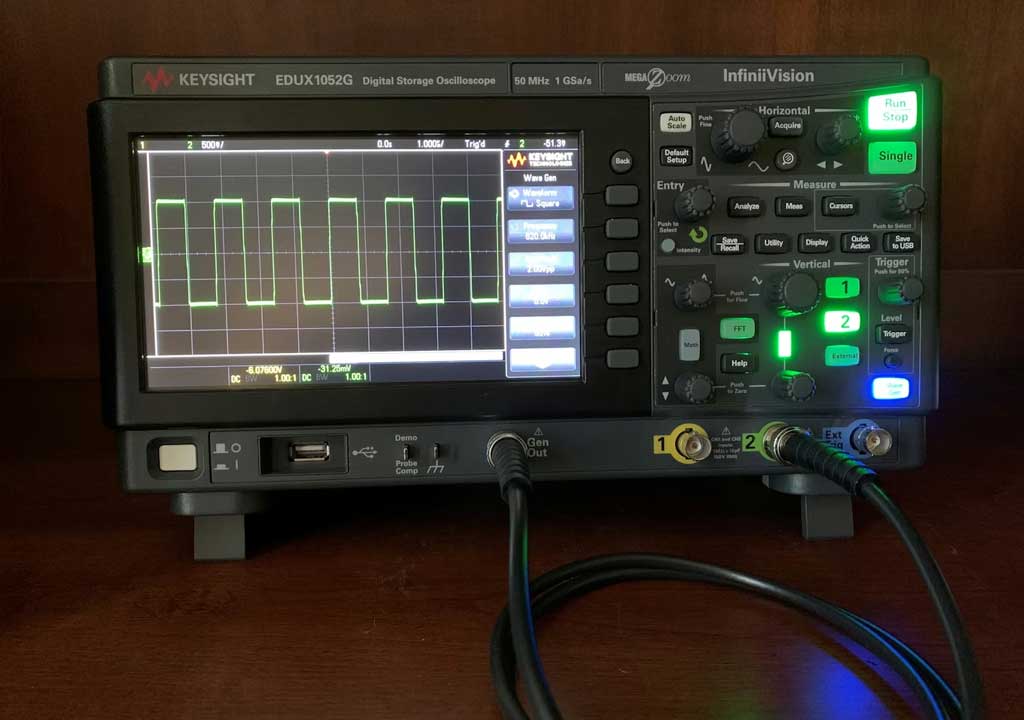
- Check the probe compensation. A poorly compensated probe will distort square waves into rounded or slanted edges. Use the scope’s probe compensation test signal (often a square wave) and adjust the compensation pot on the probe until the edges are crisp and vertical.
- Reduce noise by shortening leads. Ground leads that are long create loops that pick up EMI. Use a ground spring or a short ground lead when possible.
- Ensure proper shielding and a clean ground plane. If the device under test is noisy or floating, consider using differential probes or isolating the measurement with an isolated probe.
- Check the room power and interference. Nearby equipment, fluorescent lighting, or power supplies can inject noise. If possible, measure away from noisy devices or power supply lines.
- Use the scope’s averaging or filtering features with care. While averaging can reduce fixed noise, it may also obscure real transient details. For fast signals, single-shot or peak-detect modes can be more informative.
In some cases, reducing bandwidth (using a bandwidth limit) or enabling a noise-reduction setting helps, but be mindful that you’re not hiding a real, high-frequency component of the signal.
2.4 Aliasing and shimmering that seems “fake”
Symptoms: The waveform appears to change as you scroll the time base or sample rate, and you suspect the scope is misrepresenting the signal.
- Check the sample rate and bandwidth. If the signal contains frequency components close to or above the scope’s bandwidth or sampling rate, aliasing can occur. The scope’s bandwidth and sample rate determine what it can accurately reproduce.
- Increase the sample rate or select a faster time base. If measuring a fast edge, you may need a higher sampling frequency to capture the edge shape accurately.
- Enable or adjust the anti-aliasing settings if your scope offers them. Some scopes provide an anti-alias filter option that can help when scrolling across long time scales.
- If the signal is periodic, switch to a longer capture and use persistence or averaging to reveal the true waveform. Alternatively, use a higher-bandwidth probe and confirm the measurement path isn’t introducing delay or distortion.
Tip: For high-speed digital signals, aim for a sample rate of at least 5–10 times the highest fundamental frequency or use the longest possible memory depth with an appropriate trigger to capture the complete waveform.
2.5 Poor triggering or unstable displays
Symptoms: The trace jitters, slides, or fails to lock onto a repeating pattern.
- Set the trigger type to Edge and the slope to the direction that matches your signal’s rising or falling edge. For noise, try a small amount of hysteresis or a peak-detect trigger if available.
- Adjust the trigger level near the signal’s edge. Too far above or below the edge can cause the waveform not to trigger consistently.
- Choose an appropriate trigger source. If you’re measuring a signal on CH1, set the trigger source to CH1 instead of an internal free-running source.
- Try single-sequence mode. If you’re trying to catch a one-shot event, single-shot triggering ensures you capture the event once the trigger fires, rather than continuously sweeping.
- Look for noise on the trigger path. A noisy trigger can cause jitter. A small threshold or a digital filter, if available, can help.
Remember: triggering is about stability and reproducibility. If the signal is not naturally periodic, consider using a one-shot trigger or a different trigger mode (such as pulse width, runt, or runtn).
2.6 Channel misreadings and calibration drift
Symptoms: Measured amplitudes don’t match expectations or a known reference, and the discrepancy changes with position on the screen or over time.
- Check the probe and channel attenuation setting. If the probe is 10x and you set the scope to 1x, the displayed voltage will be off by a factor of 10.
- Verify the probe compensation against a known square-wave reference. If compensation is off, your amplitude and edge timing will be distorted.
- Consider a quick calibration routine if your oscilloscope offers it, or compare measurements against a known reference signal with a precision source.
- Check for temperature or aging effects that may cause slight drift. If you’re using the scope in a high-heat environment, consider re-checking calibration after cooling down.
Tip: Keep a simple test signal (e.g., a 1 kHz square wave with known amplitudes) handy to verify consistency during extended sessions.
2.7 Grounding issues and ground loops
Symptoms: Open, noisy, or irregular traces due to improper grounding.
- Always connect the probe ground to a solid ground reference on the test circuit. Avoid long ground leads; use a ground spring accessory or a short ground wire directly from the probe tip to a ground point.
- Avoid creating a ground loop by using a single common ground reference for multiple measurements. If you must measure two points, consider differential or isolated probes instead of tying grounds across the circuit.
- If measuring high-voltage or floating circuits, ensure voltage isolation or use an appropriate differential probe to avoid safety risk and measurement error.
Grounding is often overlooked but is a frequent source of misleading noise and mis-measured waveforms. Take a moment to recheck ground connections before chasing software or setting changes.
3. A practical troubleshooting workflow you can follow
Adopting a consistent workflow helps you quickly move from symptoms to a fix. Here is a practical, beginner-friendly workflow you can apply to most oscilloscope problems:
- Safety first. If you’re working with mains-powered circuits or high voltages, ensure you are using proper isolation, PPE, and safe handling. Do not touch exposed conductors while the scope ground is connected.
- Confirm the basics. Power on the scope, verify the display, and ensure you’re using a known-good channel and probe. Check that the probe is connected to the right input and the signal source is active.
- Check the path from signal to screen. Look at the probe, probe plug, BNC connector, and the cable for any obvious damage or loose connections. If you have more than one channel, try swapping channels to see whether the issue is channel-specific.
- Choose a simple, known reference signal. Use a function generator or a built-in test signal if available. A clean reference helps you separate instrument issues from measurement issues.
- Inspect the probe settings. Confirm attenuation (1x vs 10x) matches the scope’s channel setting. Re-check the compensation with a square-wave test pattern and adjust as necessary.
- Validate the coupling and ground. Ensure the input coupling (AC/DC) aligns with the signal, and that your grounding is solid with a short ground lead or a ground spring.
- Adjust the scope settings. Set vertical scale to a reasonable start point, enable a reasonable time base, and select the appropriate trigger. Use auto-sweep only for a quick look; switch to normal or single-sequence for stability when analyzing a known waveform.
- Evaluate the measurement path. If you’re measuring a high-frequency signal, verify the bandwidth and sample rate meet the signal’s requirements. If in doubt, consult the instrument’s manual for recommended minimums for the signals you’re measuring.
- Document and iterate. If the problem persists, note the settings you changed and the observed behavior. Revisit each change and test incrementally to isolate the root cause.
Following this workflow helps prevent chasing phantom issues and builds a repeatable approach you can apply to any oscilloscope session.
4. Probes, accessories, and how they shape measurements
Probes are not just “attachments” to your oscilloscope—they are a fundamental part of the measurement chain. Getting them right is one of the most impactful improvements you can make for beginner-friendly troubleshooting.
- 1x vs 10x probes: 1x probes have higher input loading and can attenuate signals with poor fidelity, while 10x probes reduce loading on the circuit and extend bandwidth. Make sure the scope’s channel setting matches the probe’s attenuation to avoid errors in voltage measurements.
- Probe compensation: Most passive probes require compensation to align the probe’s RC network with the scope’s input. A casually compensated probe can distort edges and amplitude, especially for fast edges. Use the built-in compensation signal (usually a square wave) and adjust the compensation control on the probe until the square wave edges are crisp and vertical.
- Ground leads and tips: Short, sturdy ground references minimize ground loops and noise. Ground springs or micro-grabbers are helpful for minimizing loop area around sensitive circuits.
- Differential and isolation probes: For floating, high-voltage, or cryogenic environments, differential or isolated probes help you avoid safety hazards and measurement artifacts.
- Tip quality and accessories: Use shielded tips for noise-sensitive measurements. Some tips include shielding sleeves that can reduce capacitance and noise pickup.
When selecting probes and accessories, consider your typical signal bandwidth, voltage range, and the risk associated with the circuit you’re testing. A good probe setup reduces measurement error and makes troubleshooting more reliable.
5. Key performance parameters to keep an eye on
Understanding a few core specs helps you choose settings that reflect the signal faithfully, and it also helps you interpret what you see on screen.
- Bandwidth — The highest frequency the channel can accurately reproduce. If your signal has fast edges or high-frequency content, you’ll want a probe and scope with sufficient bandwidth. If you see odd distortions at fast edges, bandwidth may be the culprit.
- Sample rate — How often the oscilloscope samples the input per second. For accurate waveform reconstruction, you generally want a sample rate well above the Nyquist rate (two times the highest frequency component). For digital signals and fast edges, higher is better (5–10x or more relative to the signal frequency).
- Memory depth — The number of samples captured in a sweep. Deep memory allows you to capture long time windows at high resolution; shallow memory may cause data truncation when you zoom in.
- Vertical resolution — The number of bits used to represent each sample. More bits mean finer voltage resolution, which matters for small signal differences in noisy environments.
- Rise time and calibration — How quickly the scope responds to fast edges and how accurately it renders them. Regular calibration ensures the timebase and amplitude measurements stay trustworthy.
- Triggering capabilities — A wide range of trigger types (edge, pulse, video, i2t, runt, width, etc.) helps you lock onto the exact event you want to capture. Familiarize yourself with at least the basic edge trigger and a single-shot mode for one-off events.
When you troubleshoot, if you suspect performance issues, compare the observed waveform against the instrument’s published specs and a known-good reference signal. This approach helps you decide whether the problem lies in the signal or in the measurement chain.
6. Common beginner mistakes and how to avoid them
A few habits trap beginners into misinterpreting measurements. Here are common pitfalls and practical fixes.
- Relying on auto settings too much: Auto-sweep can be helpful for a quick look, but it often selects suboptimal vertical/horizontal scales or triggers. Learn to switch to manual settings for stable, repeatable measurements.
- Using long ground leads unchecked: Long ground leads create loops that pick up noise. Use ground springs or short ground connections, especially for high-frequency measurements.
- Ignoring probe compensation: A miscompensated probe can distort edges and amplitudes. Always verify compensation with a square-wave test signal.
- Disregarding impedance mismatches: A mismatch between the probe, cable, and scope input can reflect signals and distort waveforms, particularly at high frequencies. Ensure the impedance path is properly matched (1 M?/20 pF per channel is common for many scopes).
- Overlooking safety: When measuring high voltages or mains-powered circuits, use isolation or differential probes as appropriate, and never bypass safety features.
- Not validating with a reference signal: If you don’t have a known-good reference, you won’t know whether an anomaly is in the signal or in the measurement chain. Keep a simple reference source handy for periodic checks.
By avoiding these habits, you’ll reduce the time spent chasing false alarms and improve the reliability of your measurements from the start.
7. Quick-start cheat sheet for beginners
Use this concise checklist whenever you start a new oscilloscope session or troubleshoot a stubborn issue:
- Power on and verify the display is active.
- Attach a known-good probe and ensure the attenuation setting matches the channel’s configuration.
- Connect the ground clip to a solid ground point on the circuit.
- Set the channel to DC coupling for DC signals; use AC coupling for signals with a large DC component you don’t want to observe.
- Begin with a reasonable vertical scale (e.g., 1 V/div for a 5 Vpp signal) and a suitable time base (not too fast or too slow).
- Trigger on a clean edge; adjust the level for stable triggering. Try edge trigger first, then other trigger types if needed.
- Run the scope and observe the trace; if unstable, switch from auto to normal/single-shot mode and adjust the triggering level.
- Inspect the probe compensation with a square wave; adjust the compensation control until the edges are vertical.
- Measure with a reference signal to verify accuracy; compare to expected values.
- Document the settings and repeatability for future sessions.
Following this quick-start checklist reduces setup time and helps you get meaningful results quickly.
8. Real-world examples: walk-throughs you can relate to
Real-world scenarios help translate theory into practice. Here are two common beginner-friendly examples and how to troubleshoot them step by step.
Example 1: Capturing a PWM signal from a microcontroller
You’re trying to measure a PWM signal from a microcontroller driving a small motor driver. The signal looks noisy and the duty cycle doesn’t match what you expect.
- Start with a known-good reference. Use a simple square wave generator set to a known frequency and duty cycle to verify the channel, probe, and probe compensation.
- Set the probe to 10x and ensure the oscilloscope channel is configured for 10x attenuation. If you leave it at 1x, the actual voltage will appear ten times larger than intended.
- Switch to DC coupling to see the average voltage and edges. Adjust the vertical scale so the waveform fills a comfortable portion of the screen without clipping.
- Use an appropriate time base. For PWM, a time base that captures several cycles of the waveform helps you gauge duty cycle accurately. If you’re measuring a fast PWM, a faster time base will be necessary to view edges clearly.
- Enable peak detect or a high-sample-rate mode to reveal fast transitions. If the trace appears smeared, check the bandwidth and sample rate to ensure they’re sufficient.
- Verify the trigger. Edge trigger with a level around the rising edge helps lock the waveform. If there is jitter due to noise, a small amount of hysteresis or a different trigger mode (pulse-width trigger) can help.
Outcome: With correct probe setup, proper triggering, and an appropriate time base, you’ll see a stable PWM waveform with a duty cycle that matches your intended signal. The key is to separate measurement path issues from the actual signal characteristics.
Example 2: Measuring a power-supply ripple on a DC rail
Situation: You want to measure ripple on a DC supply that powers a digital circuit. The ripple is small, and your initial trace looks flat with some noise.
- Shift to DC coupling to capture the DC level and small ripple. If the ripple sits near the baseline and the DC level is high, AC coupling may help in some cases, but DC coupling is often preferred for actual DC offset measurement.
- Lock onto a stable trigger; a repetitive, slow ripple is easy to capture with a stable trigger. Use a single-sequence trigger if the ripple is intermittent.
- Increase the vertical sensitivity to reveal small ripple, while keeping the signal within the screen’s dynamic range. Consider using a 50 ? input if your supply output is impedance-matched or if you want to minimize reflections.
- Utilize bandwidth limits if available to suppress high-frequency noise that is not part of the ripple. This helps you see the lower-frequency ripple more clearly, but don’t filter out legitimate high-frequency content that could be part of the signal.
- Average carefully if the ripple is repetitive but with noise. If the ripple is non-repetitive, avoid aggressive averaging, as it can hide transient events.
Outcome: You obtain a clearer picture of the ripple magnitude and frequency content, which helps you diagnose the cause if ripple is unacceptable (e.g., regulator instability or poor PCB layout).
9. Safety considerations and responsible handling
Safety is paramount whenever you work with oscilloscopes and electronic circuits. Keep these practical guidelines in mind:
- Always start with the lowest risk configuration. For high voltages, consider isolation or differential probes designed for those voltages and never rely on a standard oscilloscope probe path for hazardous circuits.
- Inspect probes and cables for insulation wear, cracked jackets, or exposed conductors. Replace damaged equipment before use.
- Keep your hands dry and avoid touching live circuitry when the ground clip is connected. If you must adjust a live circuit, consider using a tool with insulated handles where appropriate.
- When measuring near mains or high-voltage equipment, use an isolation transformer, differential probes, or an isolated oscilloscope to reduce the risk to you and your device under test.
- Store probes with care. Avoid bending cables sharply and winding them too tightly, which can degrade performance and safety.
By integrating safety into your troubleshooting routine, you’ll protect yourself, your equipment, and your projects while you learn.
10. Putting it all together: a beginner-friendly path to mastery
Turning a beginners’ curiosity into practical troubleshooting ability happens through consistent practice, structured checks, and thoughtful interpretation. Here’s a simple path you can follow to build confidence and competence over time:
- Build a small toolkit: a known-good reference signal, a 10x probe, a ground spring, and a simple test circuit (or a function generator).
- Master the basics: learn how to switch between 1x and 10x, adjust vertical/horizontal scales, and set a stable trigger.
- Practice with real-world signals: a PWM signal, a digital clock, a small AC mains-powered circuit (with proper safety measures), and a DC rail with ripple.
- Learn to diagnose by elimination: start at the source (the signal path) and move outward (probe, cable, ground, scope settings) until you discover the root cause.
- Document findings: take notes or photos of waveforms and settings. A running log will help you reproduce successful measurements in the future and share findings with teammates.
With these steps, you’ll not only troubleshoot faster but also build a solid intuition for how different measurement configurations affect what you see on the screen. Over time, your ability to interpret waveforms accurately will grow, and you’ll be able to distinguish between genuine signal features and measurement artifacts with greater ease.
Conclusion
Oscilloscopes are versatile and powerful, but the most common problems stem from the measurement chain—probes, grounding, wiring, and settings—rather than from the instrument’s core capabilities. By following a methodical workflow, validating your reference signals, and paying attention to the details of probes and grounding, you’ll overcome many beginner struggles quickly.
Remember the core fixes: verify connections and ground, verify probe compensation and attenuation, set appropriate coupling and trigger, and choose a time base and sample rate that fit the signal’s frequency content. Practice with known references, document your settings, and gradually you’ll develop a practical sense for what a waveform should look like under different conditions.
Whether you’re debugging a microcontroller PWM, measuring a power-supply ripple, or just learning the language of waveforms, a patient, structured approach will empower you to extract meaningful insights from every scope session. Start with the basics, build step-by-step, and you’ll soon be troubleshooting like a pro—one trace at a time.
LIKED THIS ARTICLE? SHARE IT: